
What's the difference between the pipelines?
What's the difference between the pipelines?
Create Vocals generates a full song from scratch. Add Vocals to Track lays AI vocals over your instrumental. Add Instrumental builds a backing track under your vocal. Transform Vocals re-sings a vocal in a different voice. Voice Conversion directly swaps the voice on existing vocals.
When should I use Voice Conversion vs Transform Vocals?
When should I use Voice Conversion vs Transform Vocals?
Voice Conversion is one-shot — fastest, keeps your original phrasing exactly. Transform Vocals re-generates the take from scratch using transcribed lyrics, which often sounds more natural for full performances.
Which stem-separation model should I pick?
Which stem-separation model should I pick?
Start with Vocuno’s advanced splitter or LALAL.ai (the widest custom-stem support — drums, bass, guitar, etc.). Moises, BandLab, and LANDR are worth trying when a mix separates poorly. Suno’s stem split is only available on tracks generated with Suno inside Vocuno.
Why are some models more expensive?
Why are some models more expensive?
ElevenLabs, MiniMax, and Lyria 3 have higher provider costs and use more credits per generation. Suno and MusicGPT are the most credit-efficient. Full breakdown on the Credit Costs page.
What audio formats are supported for uploads?
What audio formats are supported for uploads?
Most tools accept MP3, WAV, FLAC, AAC, OGG, M4A, Opus, and AIFF. Clean, dry recordings give the best results across stem separation, voice conversion, and de-reverb.
Do failed generations cost credits?
Do failed generations cost credits?
No — credits are auto-refunded when a generation fails on our side.
Where do my generated tracks go?
Where do my generated tracks go?
Everything lands in your library and stays available across the app — you can pull any track into the Studio or send it to Distribution.
I deleted a track by accident. Can I recover it?
I deleted a track by accident. Can I recover it?
Yes! All your deleted tracks stay in the trash for 30 days after initial deletion. To access the trash you can go to your projects and click on trash.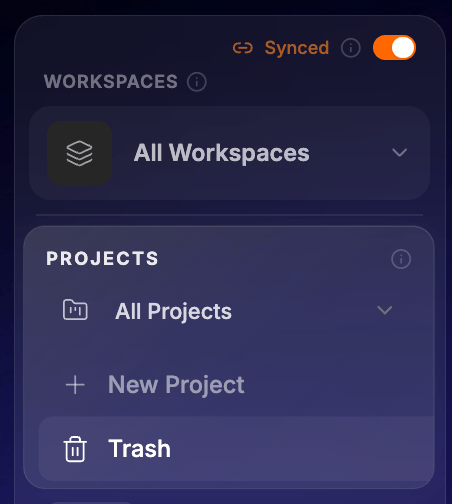
The AI vocals don't line up with my instrumental. What can I do?
The AI vocals don't line up with my instrumental. What can I do?
Split the result with Stems to isolate the vocal, then give the vocal and your instrumental to Vai and describe the fix (“start the vocal at 0:12, lower it slightly, mix it over my beat”). Vai trims, shifts and re-mixes the two files without a new generation. Full walkthrough on the Add Vocals page.
Should I use the mobile app or the web app for these tools?
Should I use the mobile app or the web app for these tools?
The web app at vocuno.com. The mobile app is built for listening and quick song creation; the pipelines, Stems, Vai and the Studio are web features, and the web app gives the best experience for any multi-step work. It is the same account, library and credits either way.